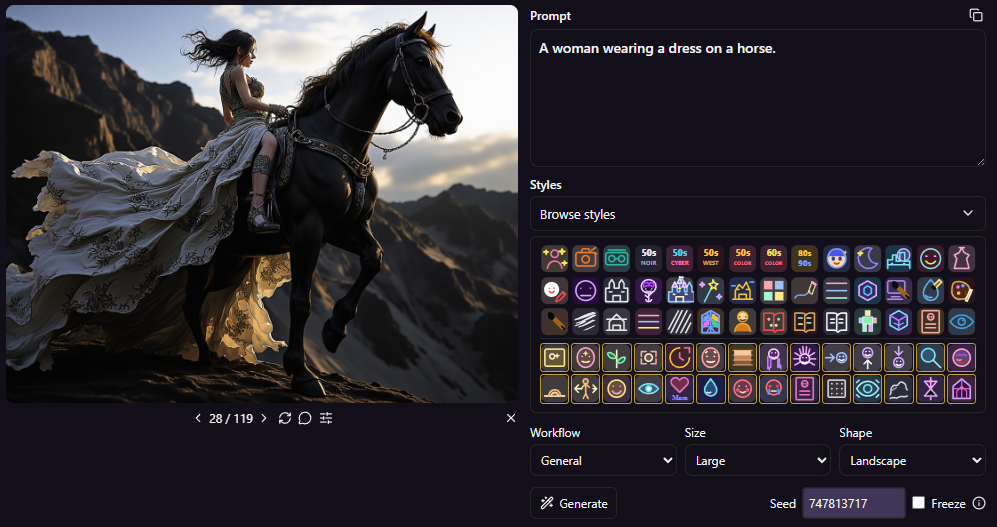
Over 70 styles, built for experimentation
The new visual style picker makes them easier to explore.
Experiment with stackable sliders such as age, hair, makeup, camera angle, atmosphere, and more. Combine them with a visual style to find the look you want.
Combine and edit up to three images
The new Image Edit workflow lets you use one, two, or three images as sources for a single result.
Want to place the subject from one image into the mood or composition of another? Select both images, describe how they should be combined, and let VaultBox create a unified edit. You can refer to Image 1, Image 2, or Image 3 directly in your prompt.
More control over the result
The image controls now clearly separate two workflows:
- General creates a new image from your prompt, with style, size, and shape controls.
- Edit transforms selected source images, with framing and shape controls.
When editing, choose how the output should fit its target shape:
- Preserve keeps the source framing.
- Pad expands the canvas to fit without cutting away the image.
- Crop fills the target shape by trimming the edges.
You can switch between General and Edit while working on the same image, create variations, and continue refining without losing the images that inspired the result.
VaultBox 1.0.4 is about making local image creation feel less like a one-shot generation and more like a creative workspace: explore, combine, refine, and keep going.